


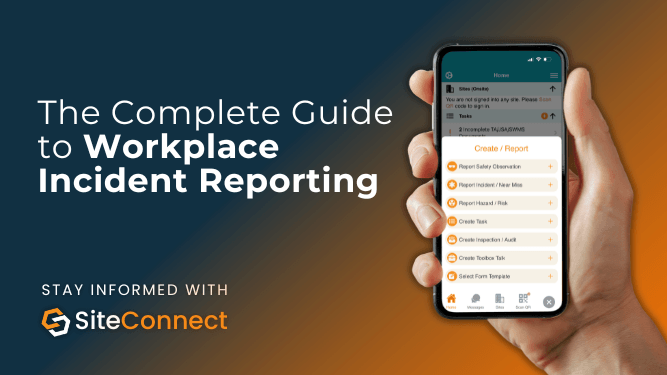

The Complete Guide to Workplace Incident Reporting
Every workplace incident is an opportunity to improve safety, reduce risk, and prevent future harm.
Whether it’s a near miss, workplace injury, vehicle accident, property damage event or environmental incident, having an effective workplace incident reporting process is essential.
Unfortunately, many organisations still rely on emails and disconnected systems to manage incidents. This often leads to delayed reporting, incomplete investigations, poor visibility and missed corrective actions.
Modern incident reporting software like SiteConnect transforms workplace incident reporting by allowing workers to report incidents directly from the field using a mobile app, while managers can investigate incidents, assign corrective actions and monitor outcomes through a centralised web portal.
In this guide, we’ll explain everything you need to know about workplace incident reporting, including why it matters, what should be included in an incident report, best practices for investigations and how SiteConnect simplifies the entire process.
What Is Workplace Incident Reporting?
Workplace incident reporting is the process of documenting, investigating and managing workplace incidents that could impact the health and safety of workers, contractors, visitors, property, equipment or the environment.
A workplace incident can include:
- Workplace injuries and illnesses
- Near misses
- Property damage
- Vehicle incidents
- Environmental incidents
- Unsafe acts or behaviours
- Equipment failures
- Contractor-related incidents
The purpose of workplace incident reporting is not simply to record what happened. Effective reporting helps organisations identify hazards, understand root causes, implement corrective actions, and prevent similar incidents from occurring again.
Why Is Workplace Incident Reporting Important?
A strong workplace incident reporting process is one of the foundations of a successful health and safety management system.
When incidents are reported promptly and investigated thoroughly, organisations can:
Become Action-Oriented
Incident reports provide valuable insights into workplace hazards, unsafe conditions and operational weaknesses.
By identifying risks early, businesses can take action before a more serious incident occurs.
Meet Compliance Obligations
Many workplace incidents require formal documentation and, in some circumstances, notification to regulatory authorities.
Having a structured workplace incident reporting process helps ensure compliance obligations are met consistently.
Reduce Hidden Costs and Downtime
Workplace incidents often result in:
- Lost worker productivity
- Medical expenses
- Equipment repairs
- Project delays
- Insurance claims
Effective reporting helps reduce the likelihood of repeat incidents and their associated costs.
Encourage Workers to Speak Up
When workers can easily report incidents and near misses, they become active participants in workplace safety improvement.
What Types of Workplace Incidents Should Be Reported?
One of the most common mistakes organisations make is only reporting incidents that result in injuries.
A mature workplace incident reporting system should capture all safety-related events, including:
Injuries and Illnesses
Any work-related injury, illness or health event should be reported immediately.
Near Misses
Near misses are incidents that could have resulted in injury, illness or damage but did not.
Near miss reporting is one of the most effective ways to prevent future workplace incidents.
Property Damage
Damage to vehicles, tools, machinery, buildings or infrastructure should always be recorded.
Environmental Incidents
Spills, contamination events and environmental breaches can have significant legal and operational consequences.
The Workplace Incident Reporting Process
An effective workplace incident reporting process follows a structured workflow that ensures incidents are recorded, investigated and resolved.
Step 1: Report the Workplace Incident Immediately
The first step is ensuring incidents are reported as soon as possible.
Delays in workplace incident reporting often result in:
- Missing evidence
- Inaccurate information
- Forgotten details
- Delayed corrective actions
Using the SiteConnect mobile app, workers can report incidents directly from site by:
- Selecting the site (project or place)
- Recording what happened
- Recording treatments given (e.g. first aid)
- Identifying affected persons
- Uploading photos and supporting evidence
- Submitting the report instantly
Once submitted, incident information becomes immediately available to managers through the SiteConnect web portal.
Step 2: Review and Assess the Incident
Once an incident has been reported, supervisors or health and safety managers should review the information and determine:
- Incident severity
- Treatment requirements
- Investigation requirements
- Regulatory notification requirements
- Immediate corrective actions
Centralising workplace incident reporting within SiteConnect ensures all relevant information is available in a single location.
Note: Incident alerts will be sent to those assigned via Notification Roles in the SiteConnect admin console.

Incident Overview Screen in SiteConnect Admin Console
Step 3: Conduct an Incident Investigation
The purpose of an investigation is to identify why the incident occurred – not who to blame.
A thorough investigation should examine:
- What happened
- When it happened
- How it happened
- Contributing factors
- Underlying causes
Effective workplace incident reporting includes documenting investigation findings so that lessons can be shared across the organisation.

SiteConnect’s Incident Investigation Tab within an Incident Record
Step 4: Assign Corrective Actions
A workplace incident report is only valuable if action is taken.
Corrective actions should:
- Address identified causes
- Reduce future risk
- Be assigned to responsible personnel
- Include due dates and priorities
SiteConnect allows managers to create and assign corrective actions directly from the incident record, ensuring accountability and follow-through.
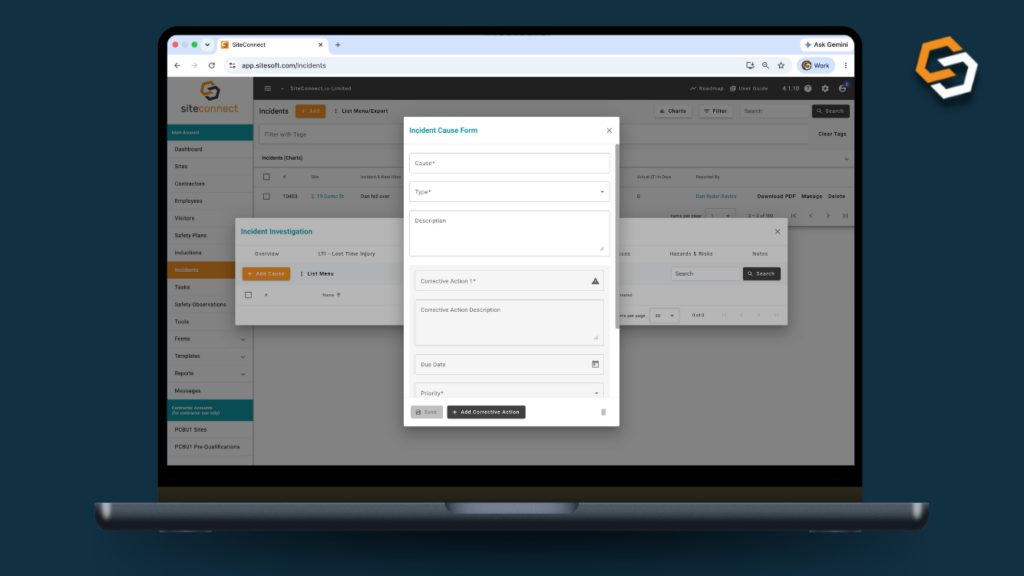
Incident Cause Form within a SiteConnect Incident Investigation
Step 5: Gather Witness Statements and Evidence
Witnesses often provide valuable information that may not be captured elsewhere.
Supporting evidence may include:
- Witness statements
- Photographs
- Videos
- Site records
- Equipment inspections
- Training records
Having all evidence linked directly to the workplace incident record improves visibility and audit readiness.

Incident Witness Form within a SiteConnect Incident Investigation
Step 6: Monitor Outcomes and Close the Incident
The final stage of workplace incident reporting is verifying that corrective actions have been completed and the incident can be formally closed.
This involves:
- Reviewing completed actions
- Conducting follow-up inspections
- Monitoring worker recovery
- Confirming risks have been addressed
For incidents involving injuries, organisations may also need to track return-to-work activities and lost time injury (LTI) information.
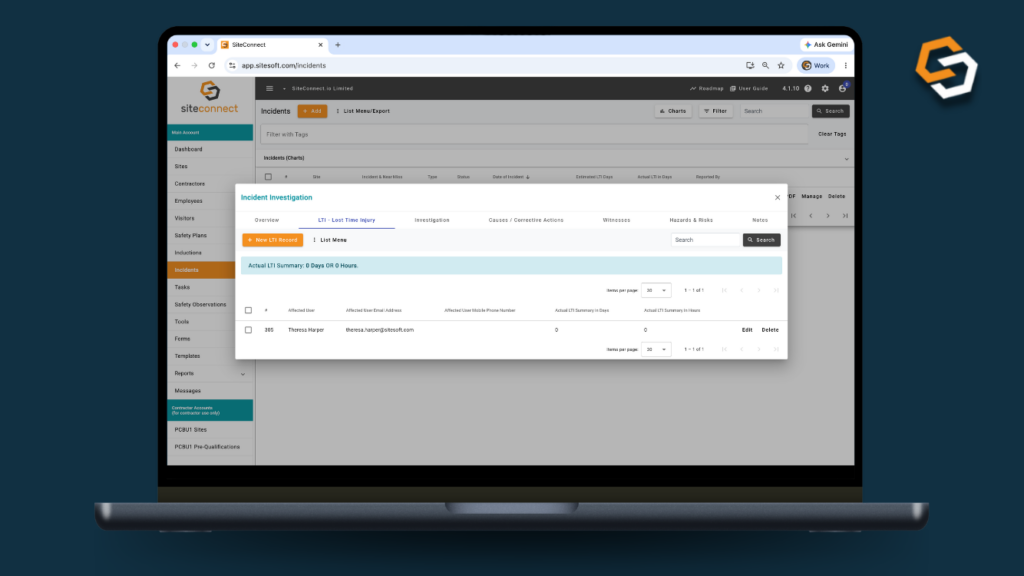
Lost Time Injury (LTI) Management within a SiteConnect Incident Investigation
Common Workplace Incident Reporting Mistakes
Even organisations with established safety systems can make mistakes when managing incidents.
Common workplace incident reporting mistakes include:
Delaying Incident Reports
Workers should be encouraged to report incidents immediately while information is still fresh.
Failing to Report Near Misses
Near misses often reveal significant hazards that would otherwise go unnoticed.
Conducting Incomplete Investigations
Investigations should focus on identifying root causes rather than assigning blame.
Losing Documentation
Storing incident information across emails, spreadsheets and paper forms can create gaps in records and make auditing difficult.
Not Following Up on Corrective Actions
Corrective actions are often the most important outcome of the workplace incident reporting process.
How SiteConnect Simplifies Workplace Incident Reporting
SiteConnect provides an end-to-end workplace incident reporting solution designed for businesses that need a faster, more efficient way to manage safety incidents.
Using SiteConnect, organisations can:
- Report incidents from the mobile app
- Capture photos and evidence in the field
- Manage incident investigations
- Assign corrective actions
- Record witness statements
- Track lost time injuries
- Store documentation centrally
- Maintain a complete audit trail
By connecting field workers with office-based managers, SiteConnect helps organisations streamline workplace incident reporting.
Workplace Incident Reporting FAQs
What is workplace incident reporting?
Workplace incident reporting is the process of documenting and managing workplace incidents, including injuries, illnesses, near misses, property damage events and environmental incidents.
Why is workplace incident reporting important?
Workplace incident reporting helps organisations improve safety, identify hazards, meet compliance requirements and prevent future incidents.
What should be included in a workplace incident report?
A workplace incident report should include details about the incident, people involved, witness statements, evidence, investigation findings and corrective actions.
Who is responsible for workplace incident reporting?
Everyone in the workplace has a role in workplace incident reporting. Workers are responsible for reporting incidents, while supervisors and safety managers are typically responsible for investigations and corrective actions.
What is the best workplace incident reporting software?
The best workplace incident reporting software enables workers to report incidents quickly, allows managers to investigate and track actions efficiently, and provides a complete audit trail. SiteConnect delivers all of these capabilities through its mobile app and web portal.
Transform Your Workplace Incident Reporting Today
An effective workplace incident reporting process is one of the most powerful tools organisations have for improving workplace safety.
By encouraging prompt reporting, conducting thorough investigations, managing corrective actions and tracking outcomes, businesses can turn every incident into an opportunity for improvement.
With SiteConnect, workplace incident reporting becomes faster, simpler and more effective – helping organisations to reduce risk and create safer workplaces for everyone.

