



A strong contractor onboarding process doesn’t need to be slow or painful. In fact, when it’s done properly inside SiteConnect, onboarding contractors becomes faster, more consistent and far easier to manage at scale.
This guide walks through the simple process of onboarding a contractor using the SiteConnect desktop platform. It shows how to move from initial setup to site-ready approval – without endless emails, spreadsheets or rework.
If you want contractor onboarding that reduces risk, ensures compliance and keeps projects moving, this is where to start.
Step 1: Add the contractor to SiteConnect
Every contractor onboarding process begins with the creation of a central contractor profile. This profile acts as the single source of truth for all key information, including worker details, pre‑qualification requirements, company and site documents, site assignments and overall compliance status. It’s the foundation that keeps everything organised, consistent and easy to manage throughout the contractor’s lifecycle.
In SiteConnect, contractors can be added in two ways:
-
Manually through the “Contractors” module
-
In bulk via import (quick and easy and useful if you’re migrating from spreadsheets or another system)
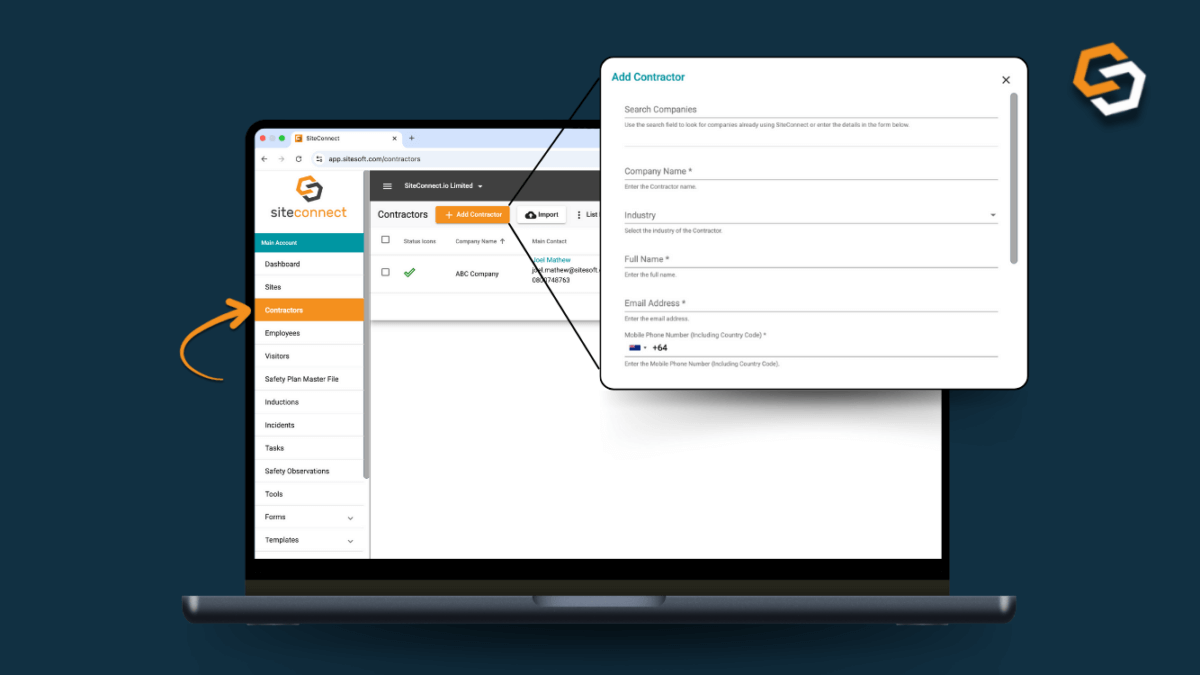
Once added, each contractor has their own account where all onboarding information lives – no duplication, no chasing.
A common onboarding mistake is collecting the same company details over and over again for every site or job.
In SiteConnect, contractor company details are stored once in their profile, including:
-
Company Name
- Industry
-
Primary contact details
- Address
This means when you reuse a contractor across multiple sites, you’re not restarting the onboarding process from scratch.
You can learn more about adding and managing contractors here:
https://docs.sitesoft.com/how-to-manage-your-site-contractors
Step 2: Upload and manage contractor documentation
Pre‑qualifying your contractors is the backbone of an effective contractor onboarding process, but it can also be incredibly time‑consuming when managed manually.
SiteConnect streamlines this with a built‑in “Pre‑Qualification” module. You can choose from a comprehensive list of pre‑qualification items or create your own pre‑qualification templates that can be assigned to contractors with a single click. Contractors can complete the request by opening the link sent to them or by logging into their account directly. As soon as they submit their information, you’ll receive an immediate notification, allowing you to review and approve the documentation without delay. Once approved, SiteConnect automatically calculates a Health and Safety Score, giving you a quick and clear view of their compliance status.
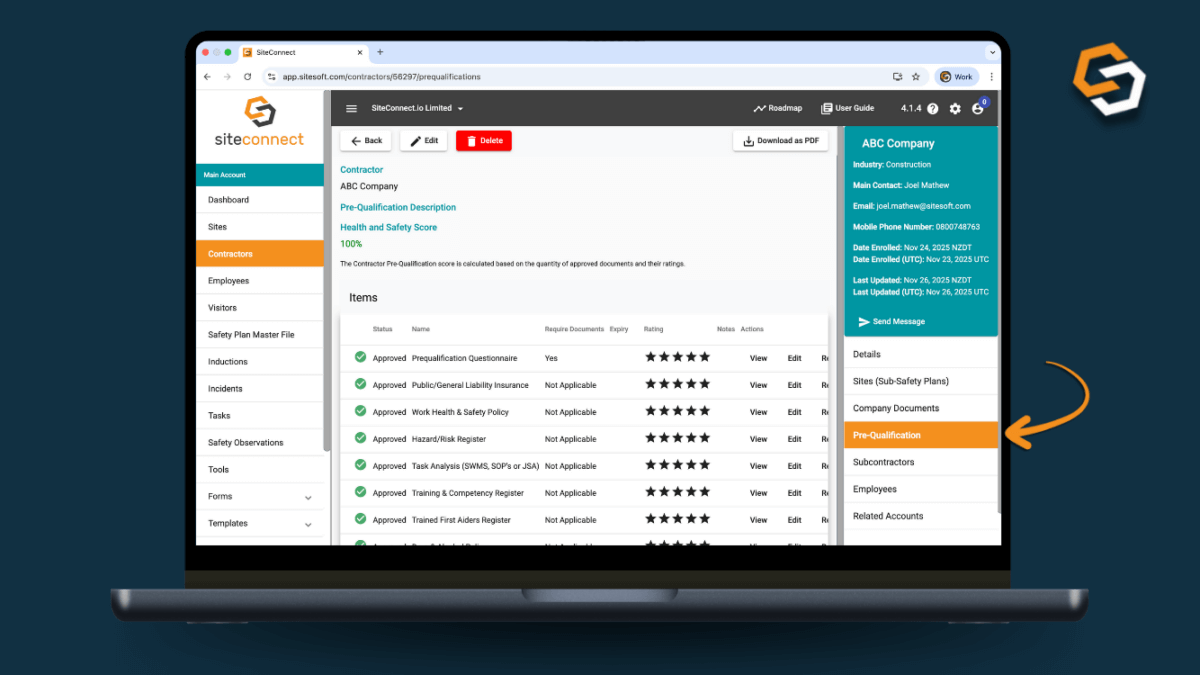
You can also upload site‑specific documents against each contractor, and contractors can upload their own documents as well. These files are visible to both parties, and the main account holder retains full control to review and approve them.
Step 3: Let contractors manage their own employees
Contractor onboarding doesn’t end at the company level, you also need clear visibility of who is actually arriving on site and whether they meet your safety and competency requirements.
With SiteConnect, contractors can:
- Add and manage their own employees
- Record each worker’s training, qualifications, and competency details, which your site managers can view directly through the app
- Enable their employees to sign in and out of your sites using the app, giving them instant access to all site‑specific safety information
- Allow employees to report incidents, submit safety observations, or complete toolbox talks via the app
- Keep employee information accurate and up to date
- Ensure the correct workers are linked to the correct contractor at all times
Your site managers gain full visibility of who is on site at any moment. They can view worker profiles, training and competency records, and any forms or documentation assigned to those workers, helping them maintain a safe and compliant work environment.
This removes admin overhead from your internal team while keeping records accurate and current.
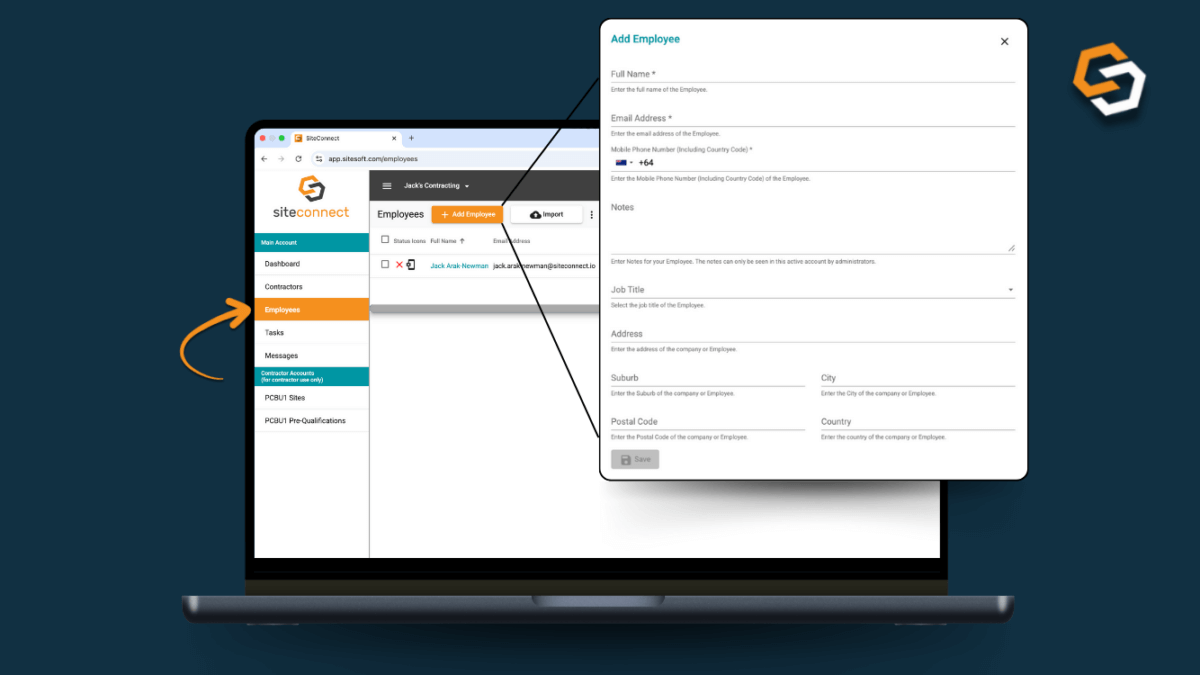
There’s a walkthrough video for contractors managing their employees here:
https://docs.sitesoft.com/for-contractors-adding-managing-employees-video
Step 4: Review contractor status and readiness
Once your contractors are fully loaded into Siteconnect you can easily view your contractor onboarding statuses at a glance.
Instead of guessing whether a contractor is approved, site managers and administrators can:
-
View a full list of contractors and their health & safety score
-
Check if information is approved, pending or incomplete
-
Quickly identify any missing, outdated, or expired information
-
Update outstanding information in real time to keep compliance current
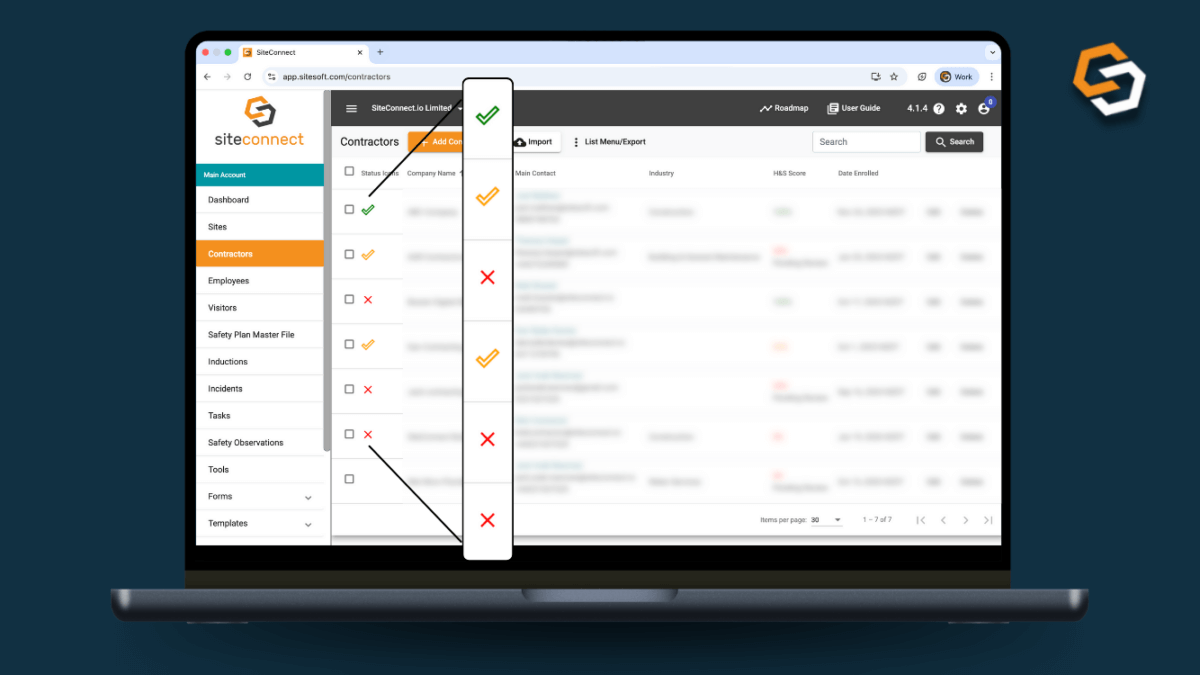 This level of visibility is essential for keeping projects moving smoothly while still meeting all compliance obligations. It allows you to stay in control of contractor status at all times and ensures that only fully approved, compliant contractors are operating on your sites.
https://docs.sitesoft.com/how-to-view-a-list-of-your-contractors
Step 5: Assign contractors to the right site (or sites)
Whilst a contractor may be approved at the company level, this does not automatically grant them access to all of your sites. Each site may have different risks, requirements, or documentation standards, so approval must be managed at a site‑by‑site level.
With SiteConnect, you have complete control over which sites each contractor is assigned to, ensuring:
-
Contractors only have visibility and access to the specific sites you choose
-
Site managers know exactly who is authorised to work on their site
-
Contractor access aligns with site-specific safety and compliance requirements
- Oversight and control are strengthened across multi-site portfolios
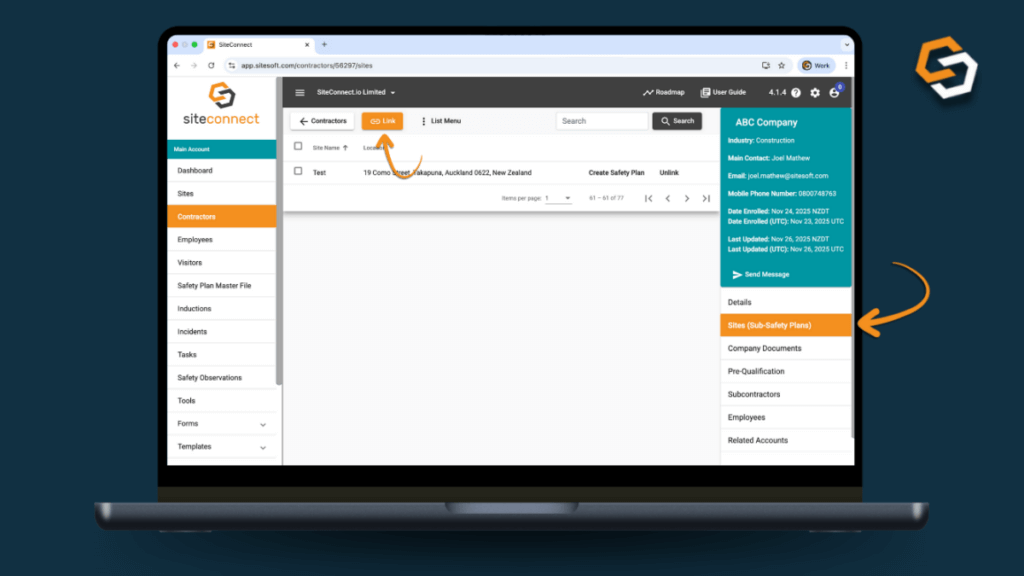 This step is essential for organisations managing multiple locations or properties.
https://docs.sitesoft.com/assigning-contractors-to-a-site-or-sites
Why this contractor onboarding process works
By onboarding contractors through SiteConnect, you:
-
Eliminate email‑driven workflows by centralising all requests, documents, and approvals in one platform
-
Reduce duplicate data entry, ensuring information is captured once and reused across sites, projects, and compliance checks
-
Improve visibility for site managers, giving them real‑time access to contractor status, worker details, and any outstanding requirements
- Create an audit‑ready contractor record, with a complete history of documents, approvals, training, and site activity stored automatically
-
Keep projects moving without cutting corners, because compliance checks happen faster and more consistently
Most importantly, onboarding becomes a repeatable, reliable process, not a last-minute scramble every time a new contractor arrives on site.
SiteConnect connects safety
A well‑designed contractor onboarding process isn’t about creating extra steps, it’s about removing uncertainty and giving everyone clarity from the start.
When contractors are added once, their documents are centralised, their employees are visible, and their site assignments are clearly defined, onboarding stops being a bottleneck. Instead, it becomes a reliable, repeatable system that strengthens safety, compliance, and operational flow across every site.
With SiteConnect, each stage of that process is built directly into the platform, from pre‑qualification to worker visibility to site‑level approvals, so you can scale your contractor operations with confidence and maintain full oversight as your portfolio grows.

