



How to Keep Track of Your Assets Without Spreadsheets or Paperwork
Managing business assets shouldn’t mean juggling spreadsheets, paper forms and mutiple systems. Whether you’re responsible for vehicles, plant, tools or equipment, modern asset management software gives you a single place to track every asset, automate maintenance reminders, improve compliance and connect safety records throughout an asset’s lifecycle.
SiteConnect’s new Asset Management module combines a powerful digital asset register with integrated health and safety workflows, helping your organisation spend less time searching for information and more time keeping assets operational and compliant.
What is asset management software?
Asset management software helps businesses track, maintain and manage physical assets such as equipment, vehicles, tools and plant throughout their lifecycle. Modern platforms, like SiteConnect, also connect maintenance, inspections, incidents and compliance records, giving organisations complete visibility over every asset.
Instead of maintaining spreadsheets or paper records, businesses can manage operational, financial and safety information from one central platform.
Asset management software typically helps organisations:
- Track assets across multiple sites
- Record maintenance history
- Schedule inspections
- Store compliance documents
- Improve equipment visibility
- Reduce downtime
- Support health and safety compliance
Why do businesses replace spreadsheets with asset management software?
Spreadsheets are simple to create but become increasingly difficult to manage as asset numbers grow.
Common problems include:
- Duplicate records
- Outdated information
- Missed maintenance schedules
- Lost documentation
- Poor visibility across sites
- Manual reporting
- No connection between assets and safety records
Because spreadsheets rely on manual updates, they quickly become unreliable.
A digital asset register provides a live, searchable record that can be accessed by authorised users wherever they’re working.
What information should every digital asset register contain?
A complete asset register should capture far more than an asset name or serial number.
SiteConnect allows organisations to record:
- Asset name, type, description and unique asset code
- Status, condition rating and ownership
- Site location and assigned users
- Vendor and contractor associations
- Purchase date and cost
- Warranty expiry and expected replacement date
- Maintenance due dates and inspection due dates
- Last inspection date
- Serial numbers, part numbers and purchase order numbers
- Vehicle registration details (where applicable)
- Asset photos, supporting files and notes
- Emergency shutdown procedures
- Tags for improved searching and reporting
- Mobile visibility and editing permissions
- Safety flags, such as critical asset status or movable asset designation
Having all of this information together makes it easier to understand each asset’s complete lifecycle – from purchase through to retirement.
How do QR codes improve asset tracking?
QR codes make it easy to identify and access asset information from anywhere.
Every asset created in SiteConnect automatically receives its own unique QR code. Scanning the code with a mobile device opens a secure, public read-only asset page containing approved information about that asset.
This allows workers, contractors, maintenance teams and auditors to quickly identify equipment without searching through paperwork or requesting information from the office.
Administrators can also:
- Regenerate QR codes
- Claim existing pre-printed QR codes
- Share assets using a secure link
Because the public page is read-only, sensitive business information remains protected while essential asset details stay accessible in the field.
How does SiteConnect connect assets with health and safety?
Most asset management systems stop at recording asset information.
SiteConnect goes a step further by connecting every asset to the health and safety activities happening across your organisation.
Each asset includes dedicated views for:
- Files
- Contractors
- Users
- Tasks
Assets can also be selected directly when completing:
- Hazards & Risks
- Safety Observations
- Incidents
- TA/JSA/SWMS/RAMS
This creates a complete operational and safety history for every asset.
For example, if a forklift is involved in an incident, that incident becomes part of the forklift’s permanent record. If the same forklift is referenced in a Safety Observation, SWMS or RAMS, those records are also linked to the asset.
Instead of searching multiple systems, everything stays connected.
How can better asset management save time?
Finding the right asset shouldn’t take several minutes.
SiteConnect includes advanced searching, filtering and sorting by:
- Asset type
- Sites
- Owners
- Vendors
- Contractors
- Users
- Status
- Condition
- Date ranges
- and more
Assets can also be archived and restored without losing historical information.
For organisations managing hundreds or thousands of assets, this dramatically reduces administration time.
Why is vendor management important?
Many organisations need to track not only assets but also the businesses responsible for supplying or servicing them.
SiteConnect includes Vendor Management where organisations can record:
- Contact details
- Insurance expiry dates
- Pre-qualified status
- Supporting notes, files and information
Vendor records also support CSV import and export, simplifying ongoing administration.
How do automated reminders improve compliance?
Missing maintenance or inspection dates can increase equipment failures and compliance risks.
SiteConnect automatically sends configurable reminder emails for:
- Maintenance due
- Inspection due
- Warranty expiry
- Expected replacement
Recipients can be customised for every reminder, ensuring the right people receive notifications before important dates are missed.
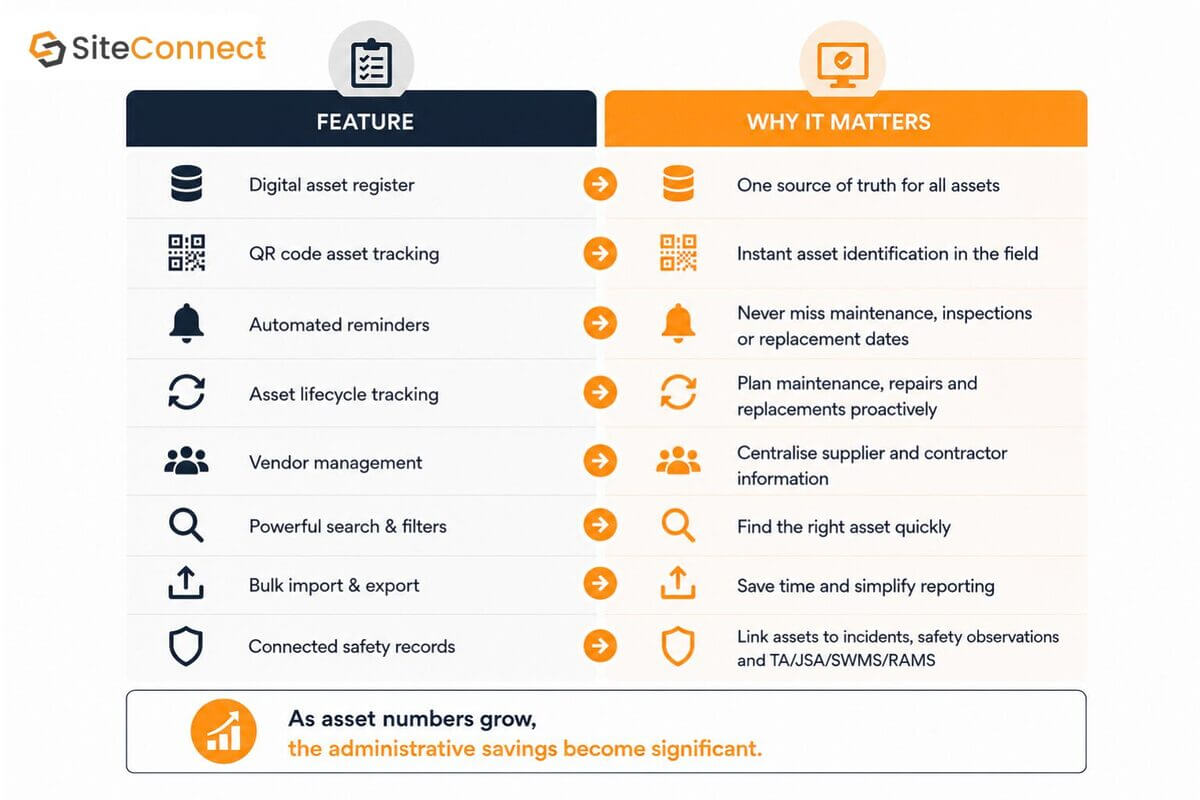
What features should you look for in asset management software?
The most effective solutions don’t just manage assets, they connect them with the wider operational and safety processes already happening within your organisation.
Frequently asked questions
Can asset management software track tools and equipment?
Yes. SiteConnect can manage tools, equipment, vehicles, plant and virtually any other business asset from one central register.
Can assets be linked to incidents?
Yes. Assets can be linked directly to incidents, safety observations and TA/JSA/SWMS/RAMS, creating a complete history for each asset.
Does SiteConnect generate QR codes?
Yes. Every asset automatically receives its own QR code, making identification simple for workers, contractors and maintenance teams.
Can I import my existing asset register?
Yes. SiteConnect supports bulk CSV imports and exports, making it easy to migrate existing asset registers.
Modern asset management
Modern asset management software should do much more than record what assets you own.
The best solutions help organisations:
- Track every asset from purchase to replacement
- Automate maintenance and inspection reminders
- Connect incidents and safety observations
- Reduce admin and downtime
- Give teams complete visibility across multiple sites
By bringing asset management and health and safety together, SiteConnect helps organisations make better operational decisions while reducing administrative overhead.
Ready to simplify your asset management?
If you’re ready to replace spreadsheets and disconnected systems, SiteConnect’s Asset Management module gives you a smarter way to manage your plant, vehicles, equipment and tools.
Explore the new Asset Management feature to see how connected asset management can make your life easier and keep every asset working safely throughout its lifecycle.

